Zoho • 11 MIN READ
How to connect Zoho CRM with Xero (Australian setup guide)
Most Australian businesses already run Xero. Here's how to link it to Zoho CRM properly, from GST mapping to who owns the invoice, without creating duplicate contacts.
Practical guides on Zoho CRM, websites and growth for Australian businesses, written by the Vixo team in Forestville, NSW. See related services →
Why Xero is usually the first question
Almost every Zoho conversation we have with an Australian business gets to Xero within ten minutes. The accountant lives in Xero, the BAS comes out of Xero, and the bookkeeper has no plans to learn anything else. Fair enough. The good news is that you don't have to pick one. Zoho CRM looks after the sales side (leads, deals, quotes and follow-ups) and Xero stays the ledger. The integration's only job is to stop someone retyping customer details and invoice lines between the two.
When these projects go wrong, it's rarely the connector's fault. It's that nobody decided which system owns which data. Switch on two-way sync with no rules and you get duplicate contacts, invoices with the wrong tax code, and a bookkeeper who quietly stops trusting either system.
Your three realistic connection options
Zoho Flow
Zoho's own integration tool has a Xero connector with proper line item support. It suits event-based rules, like 'when a deal moves to Closed Won, create a draft invoice in Xero'. It's available on Flow's Professional plan and comes included with Zoho One.
A Marketplace extension
Paid extensions on the Zoho Marketplace sync contacts, products, quotes, invoices and purchase orders on a schedule, one way or both ways, with tax and status mapping. Less flexible than Flow, but quicker to get running.
A custom integration
Deluge functions or a small middleware service, for unusual rules such as several Xero organisations, tracking categories per division or progress billing. It's more work, so only go this way when the first two options genuinely can't do the job.
Decide who owns each record before you switch on sync. The connector will happily copy a mess in both directions.
Decide data ownership first
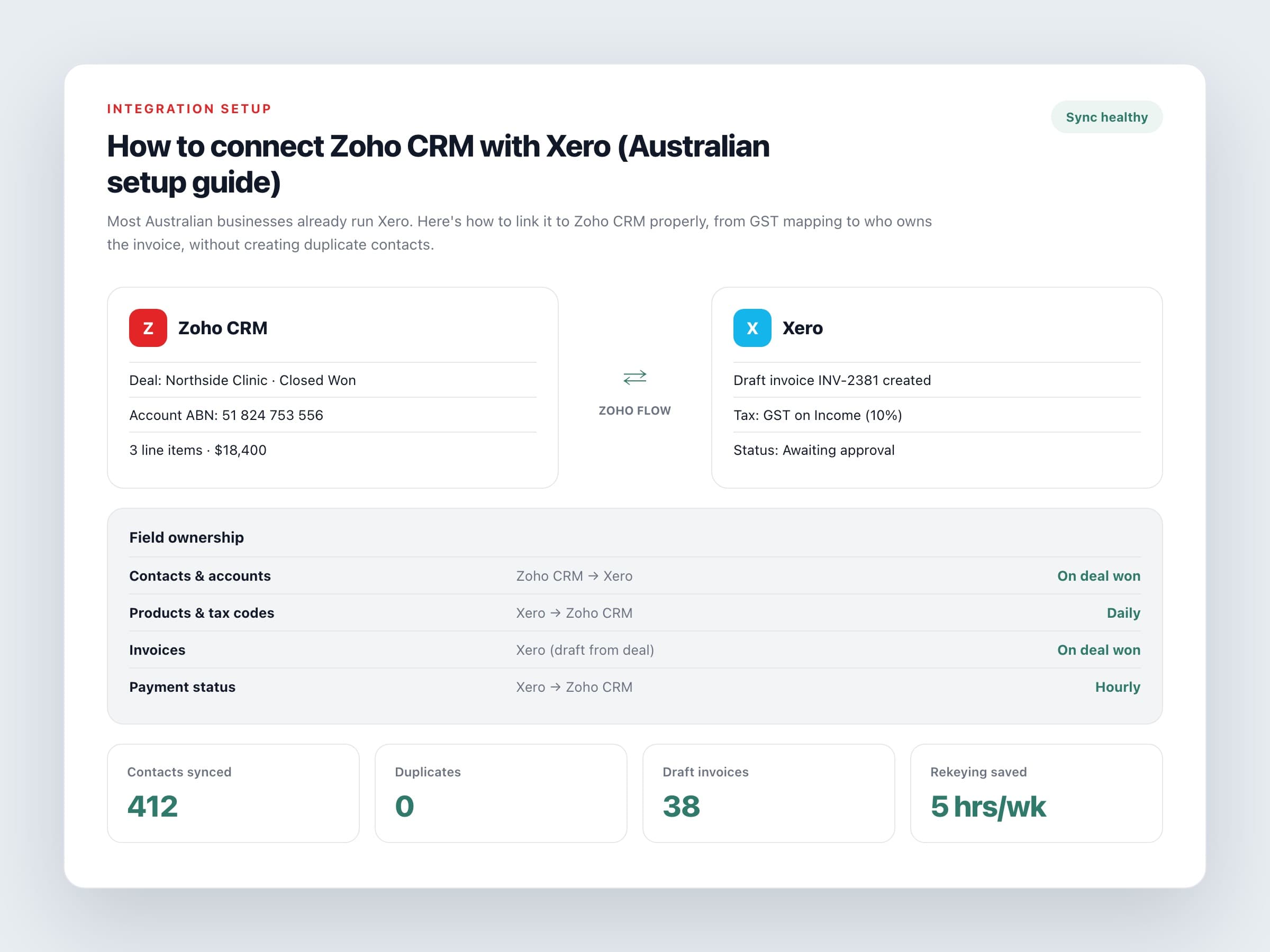
Write a one-page rule sheet before you touch a single setting. It doesn't need to be fancy. For most service businesses it ends up looking something like this.
A sensible ownership split
Customers and contacts
Created in CRM by sales, then pushed to Xero when a deal is won, not when a lead first comes in. Otherwise Xero fills up with tyre-kickers who never bought anything.
Products and services
Owned in Xero, because that's where account codes and tax rates live. CRM gets a read-only copy for quoting.
Invoices
Created in Xero as drafts from the won deal, then approved by whoever looks after accounts. CRM shows the status and amount, not an editable copy.
Payments
Recorded in Xero against bank feeds. The paid or overdue status flows back to CRM, so account managers know who owes money before they pick up the phone.
The Australian details people miss
Most setup guides are written for the US or UK and skip the parts that matter here. Get these right in testing, not in your first live BAS quarter.
Setup checks for Australian businesses
GST tax rates
Map CRM tax options to Xero's rates, such as GST on Income and GST Free Income. Decide whether CRM prices are GST-inclusive or exclusive, and stick to that everywhere.
Account codes and tracking categories
Every product needs the right revenue account. If you use tracking categories for branches or divisions, work out how CRM will pass them through.
ABN on the contact
Keep the customer's ABN in a CRM field and map it across, so invoices to businesses don't need fixing by hand.
Invoice numbering
Let Xero own invoice numbers. When two systems both generate numbers, you end up with two copies of INV-1043.
Duplicate matching
Match on email address or ABN, not company name. Otherwise 'Smith Plumbing Pty Ltd' and 'Smith Plumbing' turn into two separate customers.
A two-week rollout that works
Test in Xero's demo company or a copy of your file if you can. Run about ten realistic deals through the whole flow, including a credit note and a part payment, then sit with your bookkeeper and look at what they see. Connect the live file only after that.
Rollout steps
Days 1 to 3
Agree the ownership rules, field list and tax mapping. Clean up duplicates in both systems.
Days 4 to 7
Configure Flow or the extension and test it in a sandbox or demo organisation. Write down what triggers what.
Days 8 to 10
Have your bookkeeper and two salespeople test real-world scenarios, then fix the edge cases they find.
Days 11 to 14
Go live on new deals only. Backfill older history later, if you need it at all.
Or should you just move to Zoho Books?
Sometimes, yes. If you're already on Zoho One, Zoho Books is included and links to CRM natively. But if your accountant runs your Xero file and payroll lives there too, the integration is usually the calmer path. Either way, work out the workflow first and choose the software second.
